A common pattern I’ve witnessed with developers and leaders over the past 3-6 months goes something like the following:
Someone is told they should ‘try AI’ or has some mandate without a goal.
The person installs an AI tool or tries AI in a very specific flow they are accustomed to. AI struggles with a very directive prompt lacking context to the objective, and usually fails.
The person assumes that AI is ultimately not helpful and goes back to known ways of doing work.
Honestly, this makes a lot of sense, particularly in the absence of being able to conduct transfer learning from someone who is an expert at prompting and using AI. I was also guilty of this behavior, but I have a few friends at work and a friend personally who were what I consider ‘all in’ on AI early, and they quickly shaped my perspective of what is possible when you use AI tools effectively.
Today, let’s explore what ‘all in’ is, how you find and amplify leaders in your company who are all in, and hopefully give you some starting points based on what AI tools I’m currently using.
What does being ‘all in’ mean?
In my simple definition, being All in on AI simply means you default to using generative AI or LLMs as your partner or tool first. This doesn’t mean you’ve given up control. If anything, this definition, if maximized, maximizes the ability of you, as the individual to exploit as much creativity as possible.
Day 1 with AI
An easy way to start here is to install a general purpose app or tool of your choice (or allowed corporately), and then design your first prompt to fully ‘offload’ a task to the AI agent or model.
Your goal as you start using AI is to read and learn about the prompting strategies that work or don’t. A prompt that instructs a model to get the latest 50 results from A table and make a table from that is probably not going to be as successful as a prompt where you provide context, so what the goal is (why are you getting 50 results), and the other relevant information to accomplish the goal. The example above is representative of how I typically see people start with AI in the opening example. Many, if not most, AI tools will struggle as they lack the context to understand the request.
Moving from directive to intent in prompt strategy is a key learning. If you are using AI to build a machine learning model, consider what would happen if you gave an AI tool the prompt, context, and tools needed to build the model on its own. It will be a struggle the first few times but you’ll learn about the agent and model preferences, and ultimately be able to scale yourself far faster. You’re building your own knowledge base about how to use AI and refactoring your work.
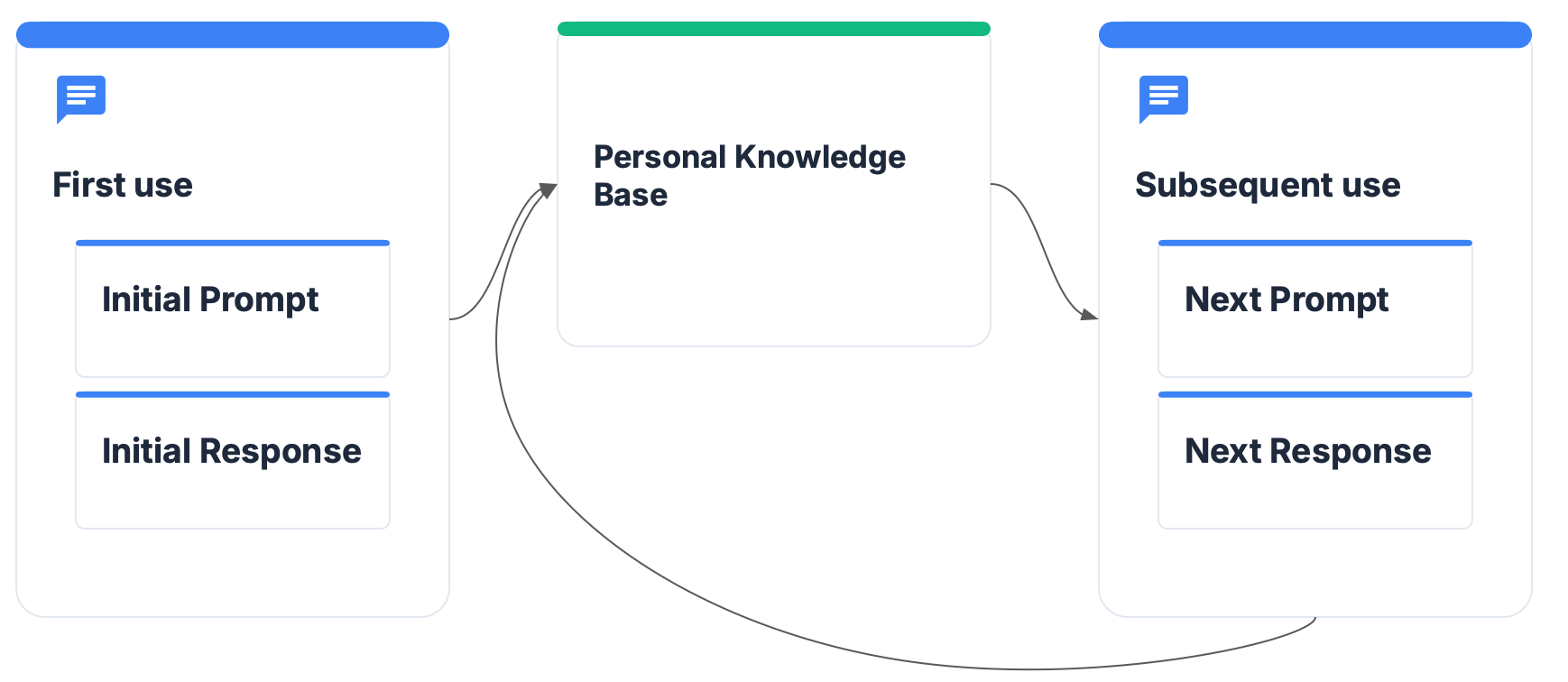
Next, AI is ultimately a team sport. Learnings should be shared, and team member should use the same tools. Each team working on common goals should have a repo for sharing skills, tools, and prompts that are useful with the coding or AI tooling. This commonality streamlines generation and debugging where everyone can help.
Day 2+
I believe most organizations have pockets of AI usage today, even in organizations that might consider themselves behind. There are other questions about ‘shadow AI’ usage that I address in an earlier post to remediate (remember most people are well intentioned, governance needs to enable experimentation with reasonable guardrails).
The question of ‘scaling’ is something I typically give to organization leaders, and it’s not a complex list:
Share your AI successes and learnings. In an increasing number of companies, I find the leadership being the most extensive AI users. As leaders are more comfortable sharing successes, failures, and learnings, this will give others the confidence to ‘try AI out’
If you aren’t using AI, use it. Of the ‘transformation’ paradigms, I’ve found AI is one where leaders need to lead from the front.
Amplify the champions. Find and celebrate those in the org who are using AI effectively. Learn about what is making AI work for them, and enable governance around the flows users have found work well.
Become experts in your business and process. I write about understanding your corporate moat, and why value stream mapping matters in earlier posts. In reality, AI is intertwined with being an expert at your business to keep an advantage. Getting started and becoming an expert mix technical, process, and business capabilities.
My current AI flows
(As of May 2026). Most people know I work at Google so my stack is going to be weighted toward Google tools, but it would be easy enough to swap these out for a number of other options. I view these more about the flow than the tool itself, although some certainly help more than others.
Day to day AI
My two most used AI products outside of coding tools are as follows:
AI Inbox in Gmail. This is surprisingly good at taking my inbox and making a to-do list out of it that I can check off for the day. I try to keep an ‘inbox minimal’ approach; AI Inbox helps summarize a few threads (sometimes this is where its a little more questionable), but the to-do lists are pretty solid and span across Gmail and other Workspace tools.
Gemini in Google Chat. Working in connection with AI inbox, Gemini in Chat also just helps with the drudgery of punch lists to get done.
Wildcard: Gemini in Slides and Docs. When these work, they’re awesome. When they don’t…. well, you know. I’ve found Slides to be good with AI at basic flow charts and Docs to be good at using Gemini to rephrase and summarize with the recent updates, which does help with my conciseness.
Planning and Coding
I’ll highlight my primary workflows here and also if you wanted to swap out tools, what I’d probably start with.
Planning
AI Studio or Gemini app. Usually I find that these do a pretty good job of giving me a list of things that I need to consider or do as a part of starting a project. Most of the time, at least in coding and software engineering, I probably know 75%+ of what needs to happen so I’m mostly using AI to fill in the gaps. These tools are pretty good here and fast enough that I’m not waiting.
NotebookLM. If there’s something I’m doing (I have one of these projects I’m starting) where I need to get a good amount of context, I’ll use NotebookLM along with my good old ability to use Search. I find NotebookLM and Gemini Deep Research to be a bit of a sword. They can scan 50,100,200 articles in a manner of minutes, but sometimes they miss the nuance in creativity that I was searching for. That said, they can also summarize a lot of commonalities at a rate far faster than I could. Learning: Use these tools with a purpose.
Coding
I’m pretty boring here. I use Antigravity IDE mostly. For whatever reason, the code at left and agent at right view just works for me, in particular with problems that require agent + human co-work.
I usually have anywhere from 2-4 threads going at once. I try to cap complex work at 1-2 workflows requiring my attention, otherwise I find the context switching for me personally just isn’t worth it. On the AI adoption levels I’m probably somewhere between a 4 and 6.
I have no problem YOLO’ing, but I find that Gemini in particular can struggle with nuance of time based decision making and implementation (ex. the repo from April 2026 is the one I really wanted even though everything else looked close).
I’m hoping to explore more this year full agent handoffs in more complex codebases, which is partially requiring me to build a few codebases. Agents in particular I think you can automate from 0 to 1, but the rails for 1 to N or N to N development aren’t there yet, nor is the token consumption model that supports this.
I’ve never been a heavy CLI user, although I do see the benefits of CLI usage by agents primarily. The SDK is probably the most interesting to me and will fit into some of the experiments below.
Experimenting
In my flows above, I set a target of trying at least 2-4 things per quarter based on new features that are out and the maturity of the models that we can use at work. This quarter, my list is:
Giving it a real shot with local models and Gemma 4. I’ve been building a local cluster with some old mini-PC’s. My colleague wrote about a setup he did here. Mine will probably be similar but I want to lean into the local model benefits and drawbacks as a part of my learning.
Implementing DESIGN.md or giving it the college try. I’ve read a few articles about the benefits of using DESIGN.md with agentic development and now I want to see if I can really accelerate my frontend work.
Standardizing my multi-agent pattern I build with. I’ve used a few but not enough to consider myself an expert. Local models fall in here somewhere and I’m hoping to have enough brain space to solidify this by the end of the summer.
Try things out!
The only way I’ve really learned in this space is being all in. I hope this gives you the confidence to keep trying things out, learning, and trying again with these tools. The learning pit is a real concept we all go through, AI just amplifies the ups and downs and compacts the overall time spent.
Get new posts by email
I send new essays by email through Substack. Subscribe there and they'll land in your inbox.
Subscribe on Substack ↗