There’s now a wealth of information and tutorials floating around about how you can go from 0 to 1 with AI, or even vibe code personalized apps or prototypes? But what’s next, and how do we use AI effectively across all parts of our coding development?
Understanding the Code Completion Curve
The feature or code completion curve tends to look something like this when you consider the amount of lines of code you write, to what actually ends up shipping based on completing the work:
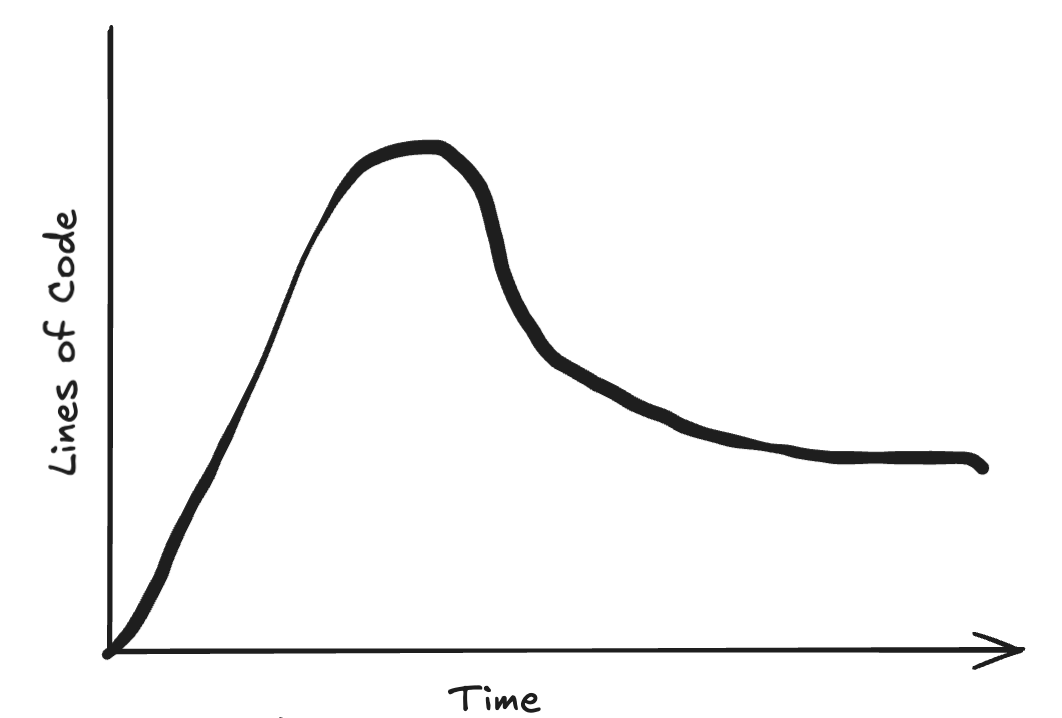
What happens at certain parts of the graph above roughly equates to how we can think about using AI for different ‘tasks’ and ‘roles’ in the coding lifecycle, positioning AI for success, and also setting us developers up to maximize our value in the cycle.
Let’s talk about the first part of this graph, where we’re writing code in order to get a feature or requirement working, or what I’m calling the Generate zone.
The ‘Generate’ Zone: Using AI as a Creative Foil
Interestingly (or not), most of the AI examples I find online anymore are heavily weighted to this code zone (I see you vibe coding). If you’ve attempted an AI experiment, this is probably where you started, and either had success, mixed success, or no success.
This also happens to be the zone where we, as humans, are the most effective. Creativity isn’t bred from next token prediction, it’s about building business context in the broader context of our applications we create and operate, and design ways to creatively implement a requirement. If we just try to put AI in this box, no one ends up happy except for the 30 minute app creators.
As we shift from generation in a 0 to 1 scenario to an incremental feature, using AI here can also help to improve our ability to onboard to code, learn it, and make changes. Here, we are asserting control over which AI tools we are using, and leveraging components of AI for efficiency and quality. Yet, we are not giving up control over what we learn, and it’s important to draw the distinction so we use the right AI components.
You’ve also generated the most code that you have to maintain when you finally get the thing working the first time, which leads us into the second, or ‘Refactor’ zone.
The ‘Refactor’ Zone: Optimizing Code with AI Assistance
Here, in the refactor and optimize zone, we apply our knowledge of coding principles, pain of the past, and other knowledge about things like performance to slowly reduce the code we built, refactor it based on good coding practices, and make the code ready to ‘ship’. Here, there’s an art and a science, but we’re using what we’ve generated as the input, and our standards and observations to reduce and refactor.
The blue zone also happens to be the next ‘underserved’ area I think about more and more for AI. While we need to provide a lot of input here, as developers we can provide specs, build observability platforms, and set goals for code refactoring that tend to rely better on an existing knowledge base than in pure generation. Which leads us to the final, or ‘move on’ zone.
The ‘Move On’ Zone: Knowing When Good Enough is Best
I call this the ‘move on’ zone, but you could also call this the danger zone of development. If things are going good enough, we need to know when to stop optimization for optimization sake and move on, and avoid the refactoring loop that can happen as we add features and then continually revisit ‘good enough’ code..
Why These Zones Matter for Effective AI Integration
For starters, when we use AI, it’s important to recognize the benefit that AI and LLM’s can provide us while also not losing the creativity and systems thinking that humans can, in fact, provide. In all cases, its about the systems around AI that we need to create and maintain in order for the LLM and us to build good software.
Practical Recommendations for Using AI in Each Zone
If you’re getting started, here are a few recommendations I have as you think about the ‘zones’, and using AI in each zone. While not all inclusive, hopefully these provide a few nuggets or places you can use LLMs or your existing systems to improve LLM performance.
Generate
Use AI as your foil. Ask LLM models, based on what you need to do and your ideas, to critique them, find potential holes, and generate potential execution plans.
Using thinking models here can be high value to see how an LLM would approach the tasks associated with the outcome you want. This allows you to refine your approach to solving the business problem.
Next, you can use an LLM to generate a task list to provide to other LLMs for completion, or even as subsets of activities as you write and test the code.
Remember that the LLM is only as good as the context you provide. An LLM doesn’t know that you’re only in us-east5, or what models you have access to. Provide this as context to get the best answers.
Refactor
Your code is working! Using a new prompt or different model for refactoring starts with a clean slate and ensures you dont overweight context that was needed in generation.
Here, ensuring your standards are written down and having few shot examples helps the LLMs refactor code as required. Following some principles for TDD here can be useful: give the LLM the test cases the code needs to pass in order to make sure the refactored code meets the goal.
Next, your other tech systems are critical here. Refactoring is an art informed by science. What calls are typically long? Does a specific call need to be optimized further to fit the wall time for an API call? Giving access to this information for an LLM via MCP allows the LLM to get this information as needed to know when to stop.
Move on
The code is good enough! You can move on to the next problem.
The systems you set up can monitor the code in the context of the platform it operates in. Setting up agents to check for long running processes or tasks is a useful and easy way to find things that may need further optimization while avoiding the trap of ‘continuous optimization’.
Share your own experiences with AI in the code lifecycle in the comments below!
This week, in what happened in my mailbox last week:
Let’s address another comment from one of my initial posts about AI usefulness:
AI is helping to remove the drudgery
YES! It can be a big daunting to think about AI especially in the context of the current market where you hear about ‘AI taking jobs’ and all these other things (look at annual reports for the full story on these companies and don’t get sucked into the AI-ness of it).
In one of my first roles out of college I was a process analyst where we value stream mapped a number of client activities. Value stream mapping is a great way to identify things in the process that arent fun or add value and see how AI can potentially work to remove the work.
Another way to help remove the drudgery is to consider what the end goals are of any process and simply apply these as a part of a prompt to thinking models. This may prompt new ways to think about a problem and remove the toil, or identify further toil that can be automated or changed.
Ultimately, the goal is to lean into what humans do best with AI being one of the most capable tools we have available today.
Get new posts by email
I send new essays by email through Substack. Subscribe there and they'll land in your inbox.
Subscribe on Substack ↗